 Luis Brancher
Testing my homelab restore: Postgres, Google Drive and a rate limit
Part two of the homelab review: dumps before the snapshot, a restore that failed twice, an encrypted copy on Google Drive, a rate limit that re-sent 57GiB, and a map to see what still hasn't been tested.
In the previous post I worked on the disks. Now comes the backup, where the review surprised me: I thought I had a copy of everything, and I didn’t.
I had daily ZFS snapshots and replication between the NAS’s two pools. But the Immich and Nextcloud databases live on the VM’s local disk, outside the NAS. And both pools sit in the same box, so a burnt power supply, a lightning strike or ransomware takes everything at once.
That made two problems: databases outside the backup, and no copy outside the house.
Dump before the snapshot
The CloudNativePG clusters run on local-path, on the OS disk. The “right” answer would be Barman shipping to S3, but I didn’t want to stand up an S3 just for this right now. I went simple: a daily dump written to NFS, before the midnight snapshot. That way the dump inherits the protection that already existed.
| Database | How | Time | Keeps |
|---|---|---|---|
| Immich | Immich’s built-in backup | 23:00 | 14 files |
| Nextcloud | CronJob with pg_dump -Fc |
22:00 | 14 days |
The Nextcloud CronJob writes to a .tmp first, validates it, and only then renames it. A half-written dump never looks like a good one:
set -eu
f="/dumps/nextcloud-$(date -u +%Y%m%dT%H%M%SZ).dump"
pg_dump -Fc -f "$f.tmp"
pg_restore --list "$f.tmp" > /dev/null
mv "$f.tmp" "$f"
find /dumps -name 'nextcloud-*.dump' -mtime +14 -delete
Along the way I found three clocks in the same flow. The Immich container on UTC, the CronJob on America/Sao_Paulo, and TrueNAS on PDT, the install default. My “midnight snapshot” was running at 04:00 Brasília time. I fixed the TrueNAS timezone and switched to explicit UTC in the file name, because the CronJob’s timeZone only decides when it runs. The clock inside the container is still UTC.
The restore that failed twice
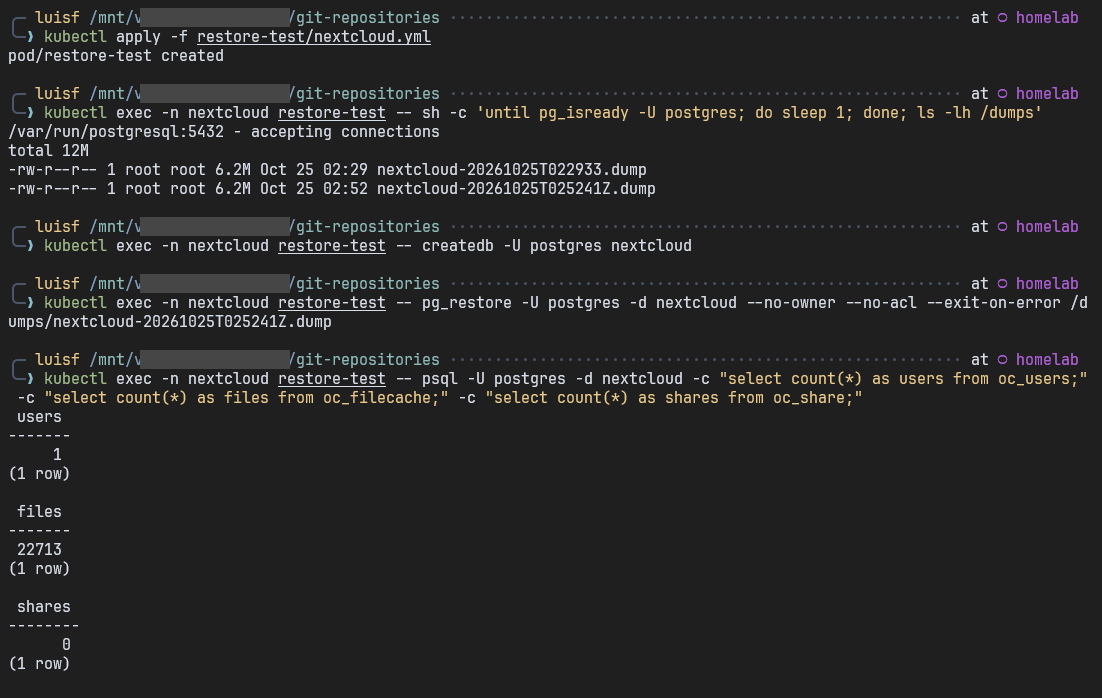
To test it, I started a throwaway Postgres in a pod, with the dumps’ NFS mounted read-only. I restore, compare the counts with production and delete the pod. Production is only read.
Nextcloud passed on the first try. Immich failed twice.
The first time, the tables ended up in the postgres database, with about 95 role "immich" does not exist errors. I had assumed the dump was a pg_dumpall, which brings the role and the CREATE DATABASE. It’s a pg_dump of the database alone, so the role and the database have to exist beforehand.
The second time, psql stopped right at the start:
invalid command \restrictStarting with 17.6, pg_dump writes \restrict and \unrestrict into the file, and psql 17.4 and 17.5 don’t know those commands. My own cluster’s image has psql 17.5, so this would have caught me in a real disaster. Since the dump is mine, I removed both lines with sed.
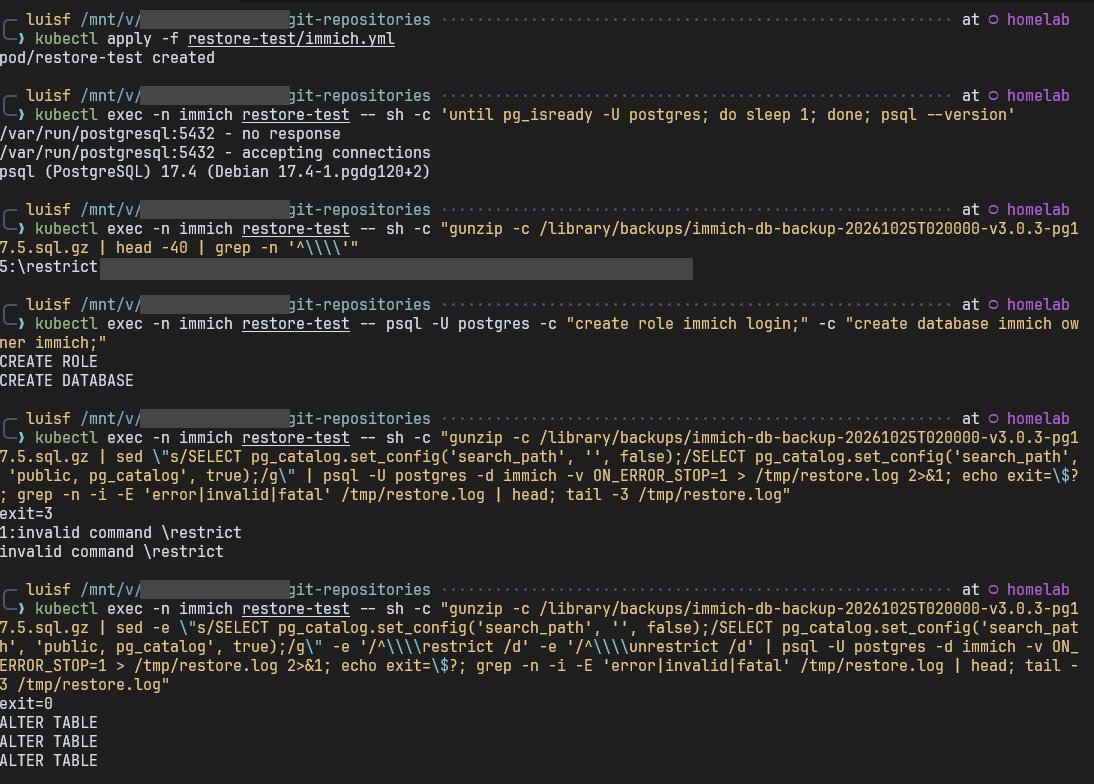
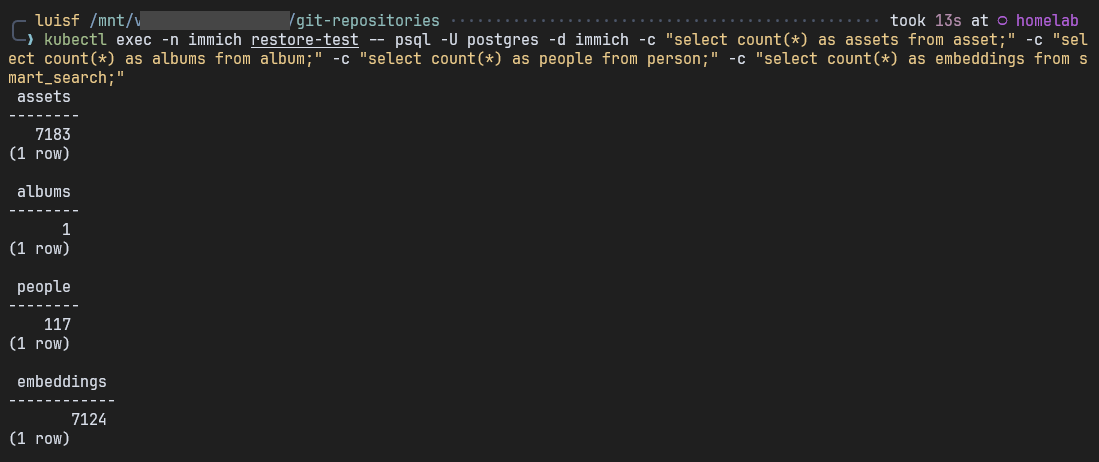
With both fixes, the restore ended with exit=0 and the counts matched: 7183 assets, 117 people and 7124 embeddings. Matching embeddings show that the search vectors came back too.
The procedure went into a runbook, with an honest warning: the disaster restore, on the real cluster, hasn’t been exercised end to end yet. What I tested was the dump.
The copy outside the house
I already pay for 5TB of Google Drive, so I went that way, with one condition: encryption before anything leaves the house. TrueNAS has Cloud Sync, which uses rclone underneath. There are three tasks (nextcloud, immich and db-dumps), with Remote Encryption and Filename Encryption.
Google still sees the number, size and timing of the files. It doesn’t see content or names. I accepted that trade for now. Further ahead, I want a box at a family member’s house receiving encrypted ZFS replication, and then the third party is out of the picture.
The mode is COPY, never SYNC. SYNC mirrors the source: a file deleted by mistake, or by ransomware, disappears from the backup too. With COPY, a deletion here doesn’t delete anything there, which also protects me in a ransomware scenario.
Password and salt live in Bitwarden and on paper. Without them, what’s on the Drive is garbage. In the same note I wrote down how to restore without TrueNAS, since it’s rclone crypt underneath. Bitwarden’s 2FA recovery code went on paper too, or I’d be creating a circular dependency.
The first upload taught me that the bottleneck wasn’t the internet. Immich, with about 16 thousand files and 8.9GiB, took 11h30 at 190KiB/s, because Drive limits how many files you can create per second. Nextcloud took more than two days, with 81606 files and 96.2GiB.
The task that failed every night
Then came Nextcloud’s first scheduled run:
[EFAULT] ... rateLimitExceededOver 9 hours, the files went up, and it still ended as FAILED. The errors were from listing and folder dates. The quota was on requests, not space, and requests grow with the number of folders. I went and counted:
| Files | Folders | |
|---|---|---|
| Total | ~88 thousand | 40828 |
| Nextcloud previews | 12169 | 33452 |
Previews were 14% of the files and 82% of the folders, and Nextcloud regenerates all of them. I put them in Exclude, together with node_modules:
/data/appdata_*/preview/**
node_modules/**
The Dry Run looked beautiful:
Without Exclude |
With Exclude |
|
|---|---|---|
| Files compared | 88997 | 56614 |
| Items listed | 258713 | 123181 |
| Time | 1h33 | 8m47 |
I thought it was solved, except a Dry Run doesn’t write anything, and it said so in the log itself: Skipped set directory modification time.
57GiB that shouldn’t have gone up
The Dry Run said 187 files to send. I ran it for real and the screen showed something else:
122 / 7211, 1.272 GiB / 57.468 GiB, 2.920 MiB/s, ETA 5h28m27sThen the hunt began. The first suspect was the trash, because a restored file changes path. A find by ctime showed only 4 files changed since the Dry Run. Then I saw Copied (new) in the log for 2023 photos that were already on the Drive, aborted, and went to check the password and salt. No decrypt errors. Duplicate folders on the Drive? Zero Duplicate in the log.
Three wrong hypotheses, and the answer was in a grep ' ERROR ':
ERROR : .../+photos/pixel-7: error reading destination directory: couldn't list directory: googleapi: Error 403: Quota ...My phone’s photo folder has 7154 files and 57GiB, exactly what showed up on screen. The quota ran out, listing that folder on the Drive failed, and rclone queued the whole folder as new. In other words, the rate limit wasn’t just an error at the end of the run: it could cause huge re-uploads. At least 268 files went up before I aborted, and they’re probably duplicated on the Drive.
The error had shown up less than two minutes after the start, even with the Exclude. The limit being hit was 240 thousand requests per minute, per project. A single NAS is unlikely to get there, so the most likely explanation is that the OAuth project is shared with a lot of other people. I didn’t confirm whose it is.
An OAuth of my own
The way out was to create my own Google Cloud project, at no cost: Drive API on, a Desktop app client and the drive scope, because drive.file wouldn’t see what was already there. The token came from rclone on my PC:
rclone authorize "drive" "CLIENT_ID" "CLIENT_SECRET"I got a 403: access_denied because the app was still in Testing. I could have added myself as a tester, but in Testing the token expires in 7 days, and the backup would start failing again a week later. I published the app, which required filling in the branding page with a home page and a privacy policy. It stays “unverified”, which only shows a warning on my own login.
I created a new credential in TrueNAS, without touching the old one, and tested it only on the Nextcloud task:
| Real run | Before | With my own OAuth |
|---|---|---|
Error 403 |
several, in under 2 minutes | 0 |
| Listing failures | 6 folders | 0 |
| What went up | a 57GiB queue | 124 new files |
Password, salt and the files on the Drive stayed the same, and then I migrated the other two tasks. The next night, the scheduled run took 8 minutes, against more than 9 hours before, and finished without a single 403.
The 700MB log
What was still left to upload was almost entirely nextcloud.log, at 622MiB and growing. I went to see why and found this on the background jobs screen:
Some jobs have not been executed since 4 months ago.Nextcloud was in AJAX mode, where jobs only run when someone opens the web interface. With nobody opening the interface, almost nothing fired. It was one line in the chart, with limits so it wouldn’t eat into the interface:
cronjob:
  enabled: true
  resources:
    requests:
      cpu: 50m
      memory: 128Mi
    limits:
      cpu: 500m
      memory: 1Gi
The pod came back as 2/2, and the sidecar went straight to 461m of CPU, chewing through four months of backlog.
The first restore from the Drive
None of this proved yet that the backup comes back. I created a PULL task into a temporary folder, bringing back the database dumps, and typed the password and salt from Bitwarden by hand. If I had used the task’s Restore button, it could have reused what’s already saved in it, and the test wouldn’t prove the copy kept outside the NAS.
cmp -s "$f" "/mnt/data-ssd/db-dumps/$f" && echo "SAME $f" || echo "DIFFERENT $f"All 12 dumps came back with readable names and byte-for-byte identical to the originals. That proves the Drive path, the encryption, the password and the salt. I didn’t test the Immich and Nextcloud tasks, and for now I’m fine with that.
While I was at it, I cut the retention of the replication to backup-hdd from 3 months to 1 month. I don’t need more than that.
I drew it all to check
When I joined a new team at work, the architecture was big and the documentation explained each piece well, but I couldn’t see the path of a message going through several of them. I stopped trying to memorize it and started drawing. It became an interactive map the team liked. I can’t show that one, but I can show the method, and with the review done I decided to try it at home, on the system I thought I knew.
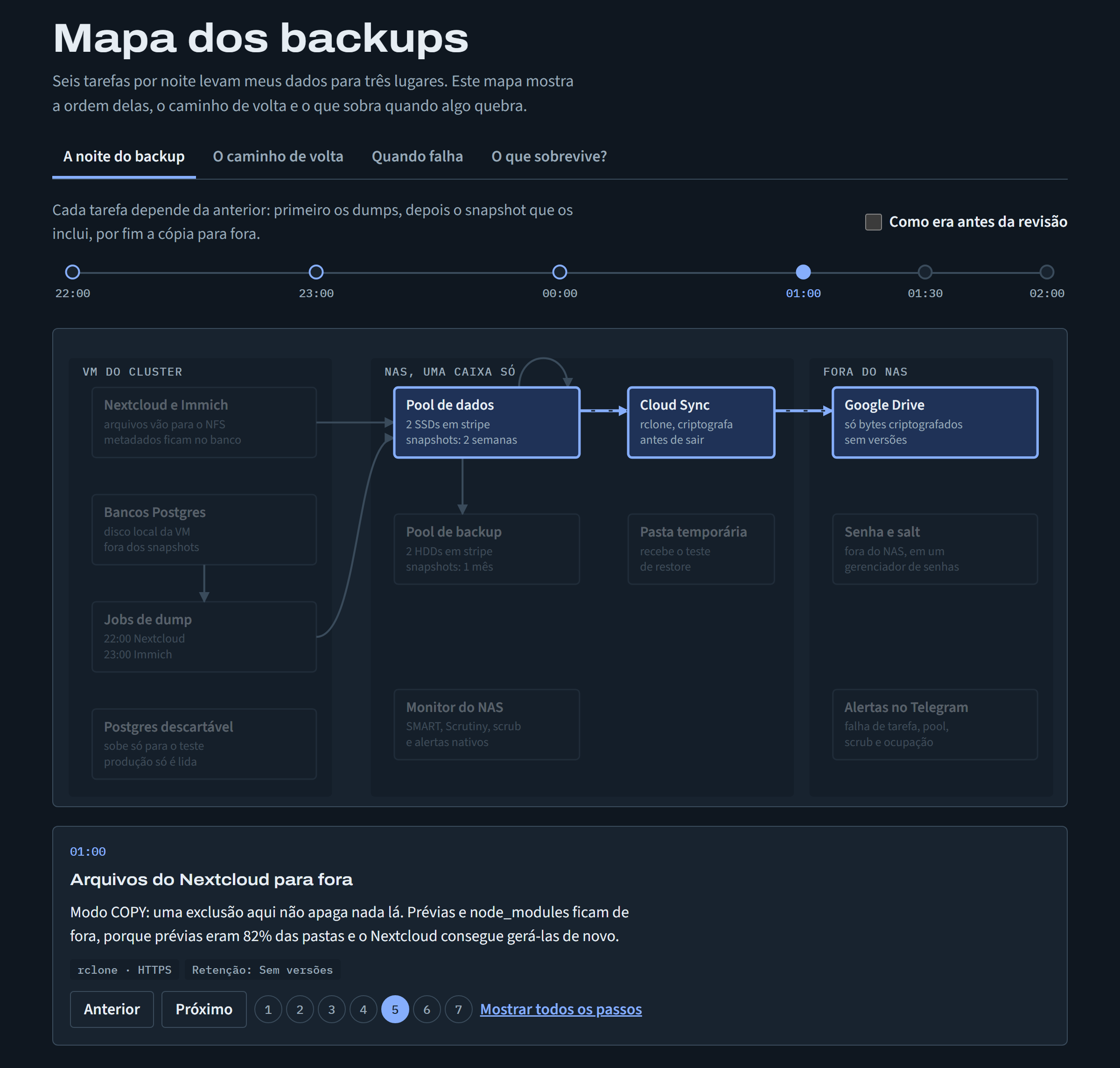
Drawing forces you to answer what reading lets slide. To draw an arrow, I need to know who calls whom, in what order and what comes back. You can’t write “it’s covered” on an arrow. The map is always visible, one step at a time, and the detail only appears when someone clicks.
There are four tabs. The first is the backup night, with the timeline to scale and a button that shows how it was before the review. Everything I described above fits in that image: the snapshot at 04:00, both copies in the same box, and the databases in a box with no arrow leaving it. In a table, that’s a missing row. In the drawing, it jumps out.
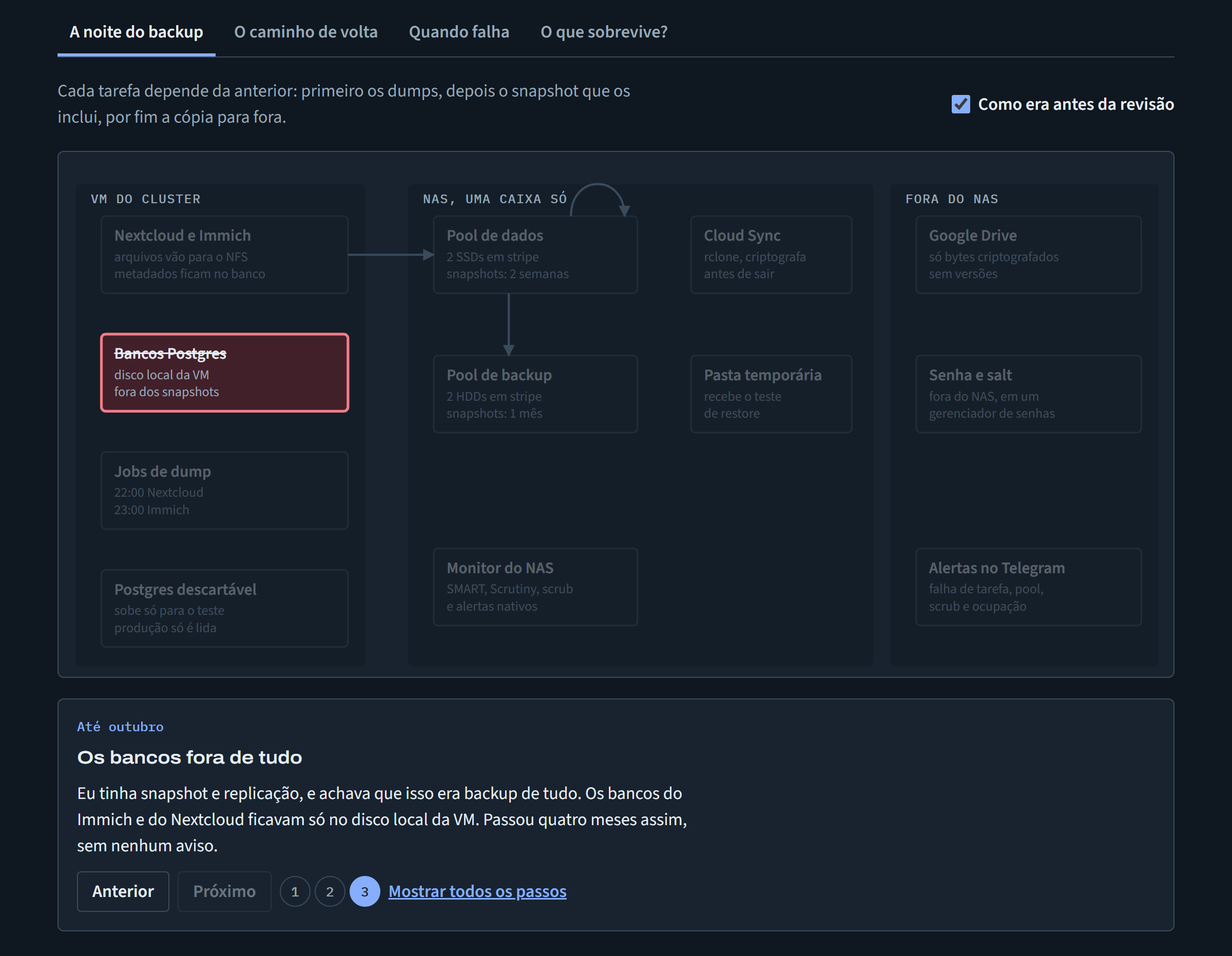
Three dashed lines
The way-back tab is the one that justifies the project. Solid lines are restores I’ve already done. Dashed ones exist in the plan but were never tested.
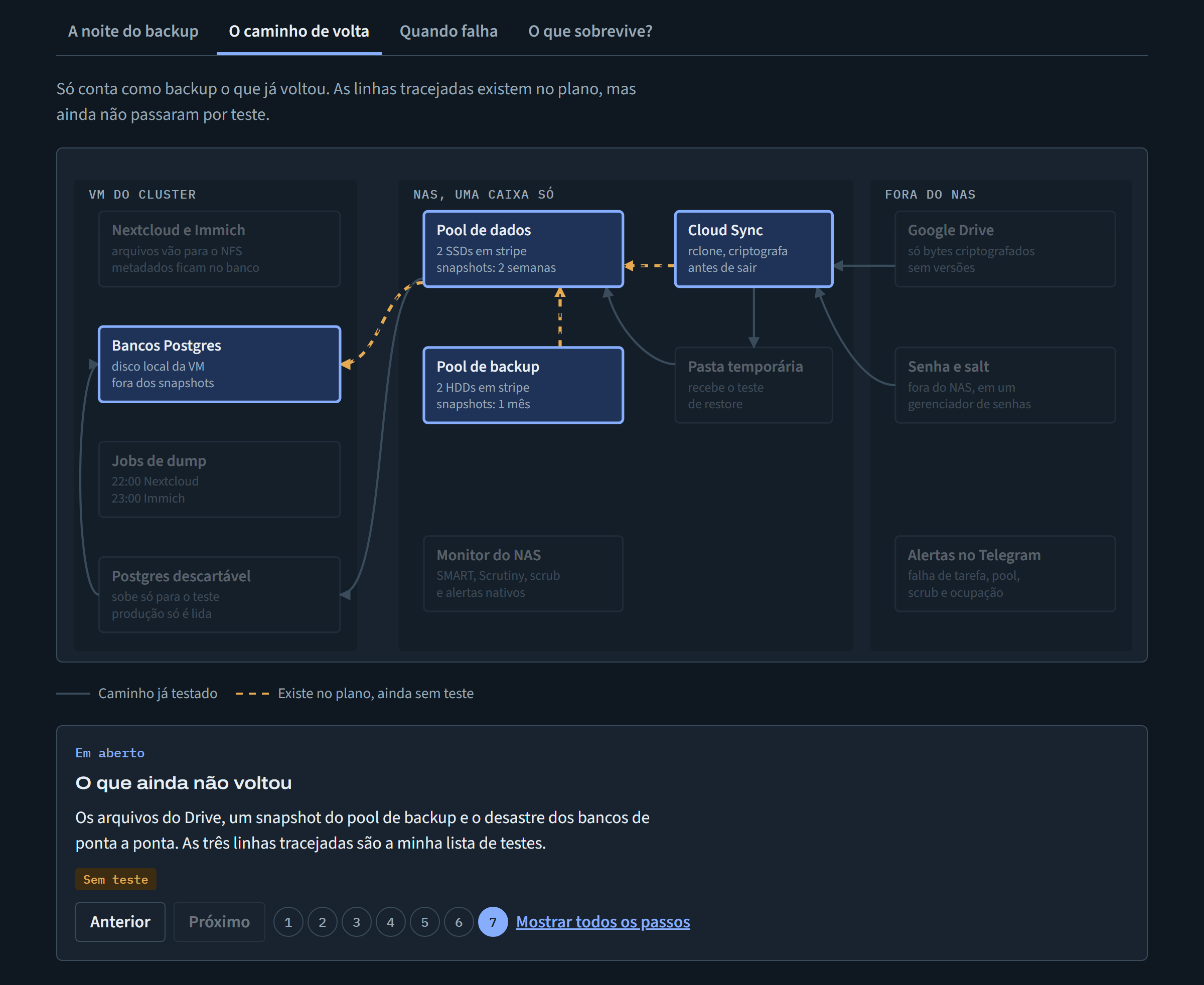
There are three: the files on the Drive, a snapshot from the backup pool, and the end-to-end database disaster. I knew they were pending. Seeing them drawn is different, because the path I count on most in a total loss is exactly the one with the least proof.
The failures tab showed another gap. Replication, Cloud Sync and the disks send alerts to Telegram. A dump that fails is recorded as a failed Job and warns nobody.
What survives?
The last tab is a simple simulator. I pick what broke (an SSD, the whole box, the VM, the keys) and the map paints what survives, what’s lost and how I’d get back. Each scenario ends by saying which part of that path has already been tested. It’s reasoning, not a disaster simulation, and the page says so.
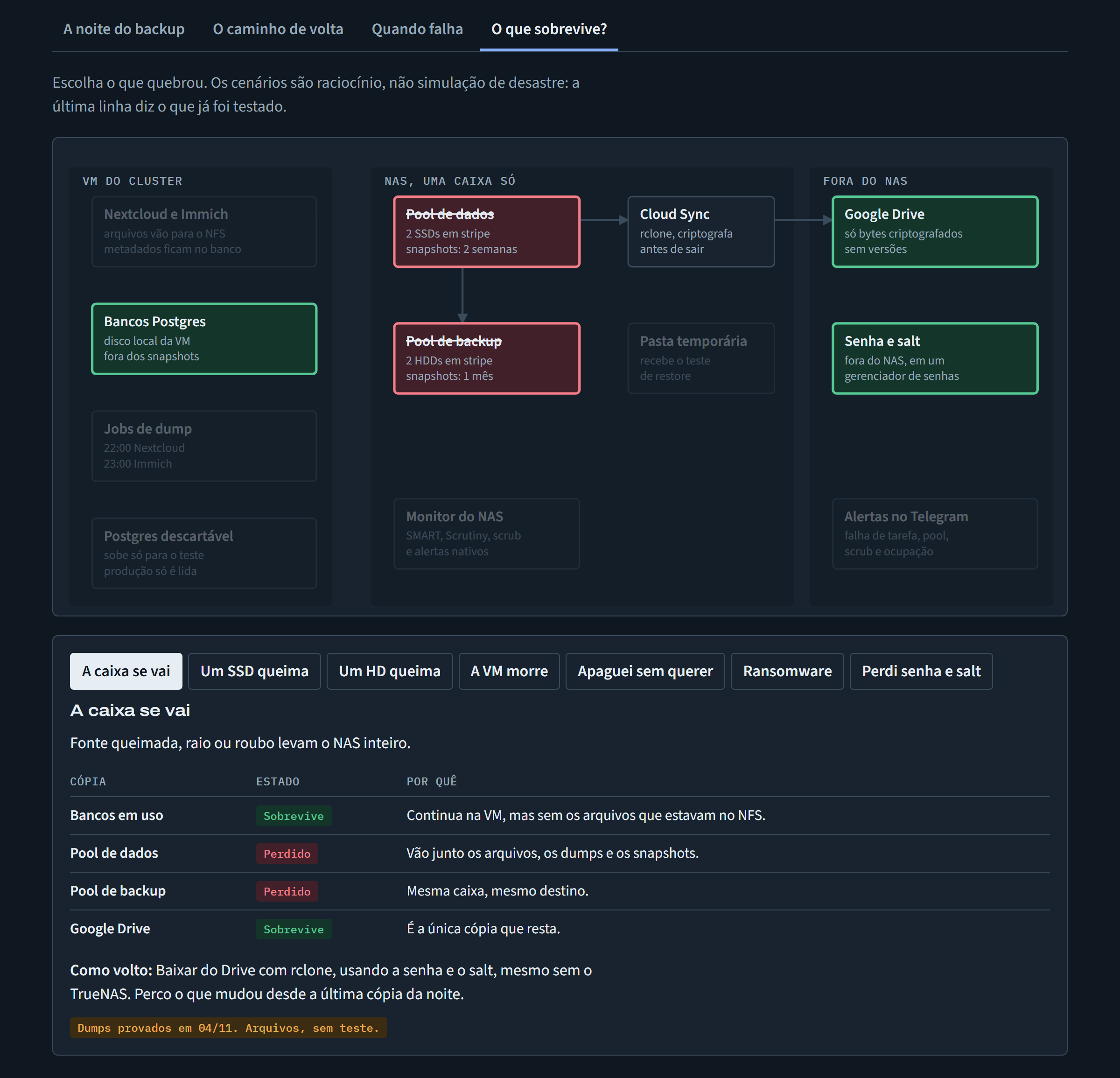
About AI, the same caveat as for both maps: it speeds up gathering the information and building the page, but it doesn’t know what changed in the system or what I’ve never tested. A pretty diagram gives a sense of safety it doesn’t always deserve, which is why the “untested” states stay on screen.
What’s still open
The dashed lines became my test list. Next is bringing a sample of the files back from the Drive, then a snapshot from the backup pool and, at some point, the disaster restore on the real cluster. Alongside go the alert for a failing dump, watching the Nextcloud log get rotated, and cleaning up the duplicated files on the Drive. When a line turns solid, I’ll update the map.
If you want to make your own, pick a flow you think you understand and draw until you get stuck. The point where the arrow has nowhere to go is your next question.